A standalone product

Foreign-Trade Zone
compliance, without the binder.

Track every unit in the zone, know exactly what sits in your activated space, and assemble the customs paperwork — admissions, temporary removals and close-outs — ready to file yourself or hand to your customs broker.

It runs on its own — no migration, no change to any system you already use.

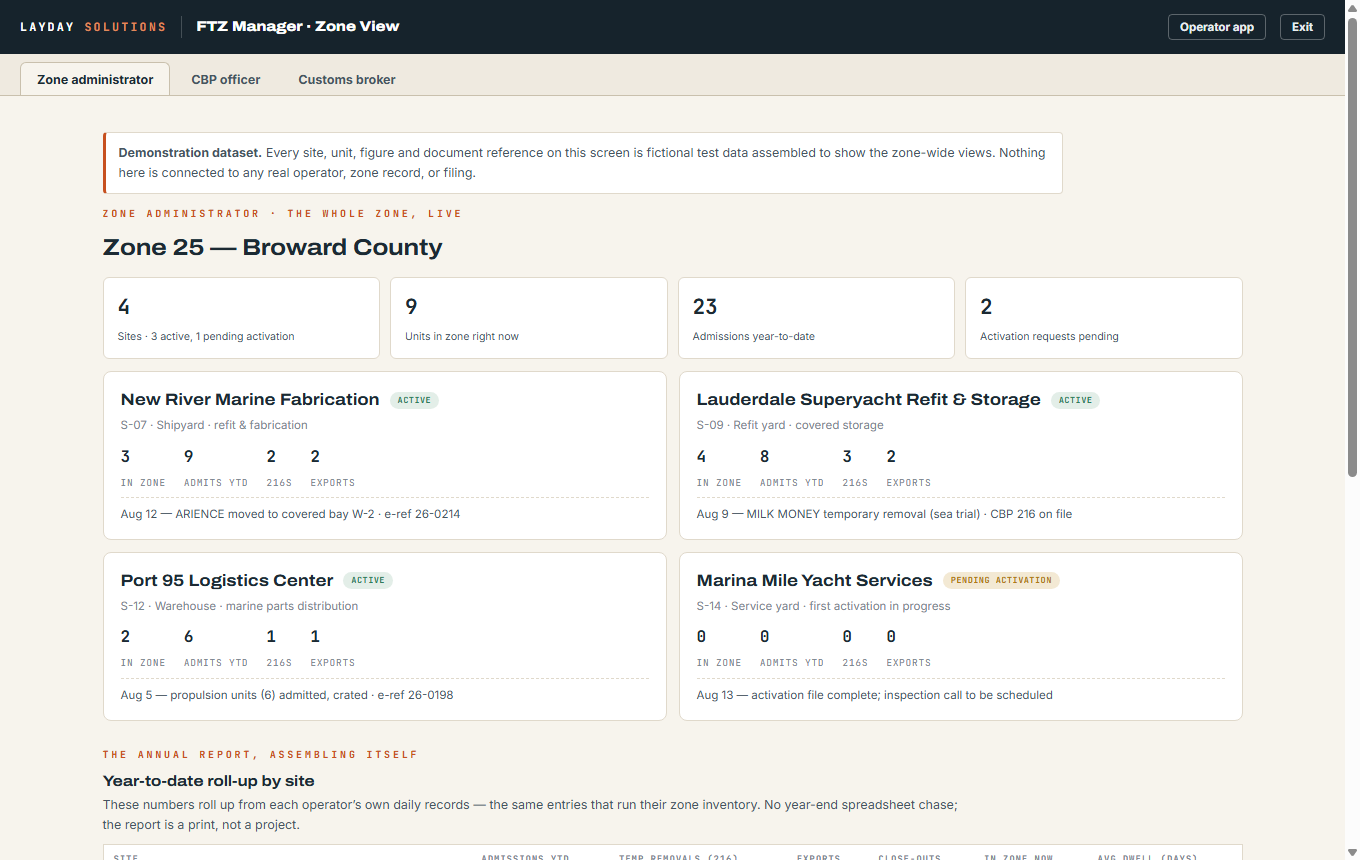
FTZ Manager zone view — every site in the zone on one screen, with the annual report assembling from daily records
The whole zone, on one screen.

Every site’s activity, live — what’s in, what’s moving, what’s pending activation — and the year-to-date roll-up assembling itself from the operators’ own daily records. Shown with demonstration data.

FTZ Manager · a standalone product

The zone is a sequence. Miss a step and the file never closes.

Activating the space is its own approval. So is every trip a vessel takes off the property, and every return it has to prove. The units in the zone, the areas that are active, and the paperwork behind both have to agree at any moment CBP asks — and most operators are holding that together in a binder and a spreadsheet.

01
Activate the spaceThe slip, the bay, the yard area — each one applied for, inspected and approved before a single unit sits in it.
02
Work the approvalThe application, the questions back, the CBP inspection and the sign-off — tracked as a process with a status, not an email chain.
03
Keep it secureAn activated area carries obligations. Who has access, what changed, and the record that it stayed compliant while it was active.
04
Admit the unitIt enters the zone against a specific activated area, documented, with the duty clock deferred from that moment.
05
Every trip off the propertyA sea trial. A haul-out at another yard. A boat show. Each one is its own temporary removal, its own permission, its own window — and each one has to come back.
06
Prove the returnThe unit is back, inside its window, evidenced. Until that is on the record the removal is still open against you.
07
The departureIt is leaving for good. Its own process, its own paperwork, its own approvals before the gate opens.
08
Proof of foreign arrivalThe evidence that it actually landed abroad. This is the step that closes the file — and the one most often still outstanding months later.
09
What is true right nowLive inventory, and which areas are active today. The two questions an officer asks first, answerable without assembling anything.
One request, three parties

One request, not three conversations.

Today a temporary removal is an email to the broker, a phone call to the yard, and a guess at Customs. Here it is one request with a state, and all three parties are looking at it. Follow a real one.

01
The yard raises itThe facility opens Endless Summer in its zone inventory and clicks 216 request. Reason: Palm Beach Boat Show. Out on the 3rd, back on the 14th. Submit.
02
The broker has itIt is in their portal before they have read the email telling them it arrived. Nothing was forwarded and nothing was re-keyed.
03
The paper still gets stampedThey export the 216, sign it, walk it to Customs, get it stamped, and upload the stamped copy back onto the vessel. Marked approved — with the evidence attached to the record, not sitting in a drawer.
04
It leavesThe yard marks the departure against the 216. The vessel is now out, against a permission, with a date it is due back.
05
Customs asks where it isThe officer opens the vessel. The old system would say it is at the yard. This one says it is out on an open 216 — and one more click shows the boat show, and the 14th.
06
It comes backThe yard marks it returned. The broker is notified and closes the 216 out. The permission is spent and the file is clean.
07
Asked againThe officer looks a week later. Endless Summer is in the zone, at the yard, in slip P06.

Each party only makes its own move. The yard requests, departs and returns it. The broker files it, uploads the stamp and closes it. Customs reads. Nobody performs somebody else’s step, so the record can be trusted.

The audit

The officer never leaves the office.

An audit today means somebody drives out and somebody else spends three days building a binder. The record already exists — it is just scattered across a filing cabinet, an inbox and one person’s memory. Here it is assembled the moment it is asked for.

01
Pick a windowThe past year, the past quarter, since the last audit. Every vessel that touched the zone comes back as one list — printable as it stands.
02
Open any vesselIts whole file, in the order it happened. Not a search result — a sequence.
03
The entryThe 1300 that brought it in, with the paperwork behind it.
04
Every removalAll six 216s if it took six — each with its reason, its window, its stamped form and its proven return.
05
The departureWhen it left, under what authority, with what filed.
06
The proofForeign arrival, evidenced. The step that closes the file — visible, or visibly missing.

An auditor reads a unit’s history in order — admitted, removed and returned each time, departed, proven gone. The file assembles and prints in that order.

Why the binder never worked

A vessel that stayed three years lived in three binders.

Zone records get filed by the year the unit arrived. A vessel’s life does not respect year boundaries. So closing out something that sat two or three years means going back through previous years to find its entry and its early removals — and that is what happens when the filing is done correctly. The system is not failing; the shape of it is wrong.

Filed by year inEvery arrival goes into that year’s book, in order. Neat, and useless the moment a stay crosses a New Year.
Retrieved by vesselBut every question — from Customs, from the owner, from your own close-out — is about one vessel across its whole life.
Held here as bothOne record. The year view and the vessel view are the same file seen two ways, and neither costs you a walk to the cabinet.

Records are kept for the period Customs requires — and then kept anyway. The zone’s history stays yours for as long as you run on it, exportable on request, not thinned to the audit window.

The annual visit

They pick the files at random. So every file has to be right.

Once a year the officer arrives, and part of it is a spot check — a handful of vessels chosen at random, pulled to see whether anything is missing or looks off. You do not get to choose which ones. A binder gets made ready once a year, in a hurry; a record kept in the system is complete all year.

The random sampleWhichever vessels they name, each one opens whole and in order — entry, every removal, the return, the departure, the proof.
The numbersWhat the zone earned, per unit and in total. It is a financial review as much as a paperwork one, and most operators cannot answer it quickly.
The facility itselfHow many cameras and where they cover, who holds access to activated areas, and when that list last changed — on the record, with its history.
The alerts that keep it that wayA removal past its due-back date, proof of arrival still outstanding, an activation about to lapse — surfaced when they happen, not discovered in the audit.
Still printableThe officer will usually want it on paper. Any view prints as a clean packet — the screen is the source, the print is the copy.
Or read from their own deskGive the officer their own account and the visit starts from what they have already reviewed, instead of from a filing cabinet.
The slip knows

Activating a slip changes what you can put in it.

Once a slip is activated you cannot simply berth the next boat in it. Either that vessel gets a domestic entry, or the slip comes back out of the zone — and both are processes with Customs on the other end. Get it wrong and a vessel is sitting in zone space it has no business being in.

The wrong vessel is stoppedAssign a non-zone vessel to an activated slip and the system stops you, then offers the two legitimate ways forward — enter it domestically, or deactivate the slip.
Pending means emptyBetween the request and the approval the signage is up and the slip must stay clear. It is blocked from assignment until the approval lands, because that is the window an unannounced visit hurts most.
You always know which onesSixty slips or a hundred and sixty, the activated ones are a live list rather than something anyone is expected to remember.

This only works because the same system holds the berth assignment and the zone status. Two separate products cannot check each other.

Activation

You are already doing it over video.

Activating space used to mean an email, a week of waiting, and an officer arriving unannounced — sometimes leaving the notice before you knew they had been. Now it is a scheduled call and a walk round the slip with a camera. Customs moved that way on their own. The tooling just never followed.

01
Request itThe slip, the bay, the fenced area — raised with its photo attached, against the space itself.
02
Hold it emptySignage up, nothing berthed, the space blocked from assignment until the answer comes back.
03
The callScheduled, on the record. Walk the space on camera and answer the questions — which way the sign faces, who holds access.
04
The approval landsFiled against that space, dated, with the photo and the questions kept beside it. Not in an inbox.
05
And back out againThe vessel leaves, you request deactivation, show it empty, and the space returns to ordinary use — with the whole round trip on the record.
The part nobody says out loud

Lose a 216 and it is gone.

There is nowhere to request a replacement from. Customs does not hold a copy they can hand back, and there is no way to look back at what was filed years ago. They rely on the operator to keep the paper trail — which means the filing cabinet is not a copy of the record. It is the record, and it is the only one.

Nobody can replace itNot the broker, not the yard, not the government that will audit you for not having it. What is lost is lost.
So it should not live on paperOne cabinet, one flood, one office move, one person who filed it somewhere sensible in 2021.
Held properly, and yoursBacked up, retained past the statutory period, and exportable on request — because it is your record, and you are the only one holding it.

Built for operators and the customs brokers who manage them across many facilities · regulatory specifics confirmed with CBP and licensed counsel.

Three sides of a zone, three doors

The facility, the customs broker, and the officer — each with their own key.

A Foreign-Trade Zone has three parties who each need a different view of the same truth. FTZ Manager gives each one its own account type — nobody borrows somebody else’s login, and nobody sees more than their role.

The facilityRuns the zone day to day — inventory, admissions and removals, activation requests, and the zone’s billing. Sees its own property, fully.
The customs brokerOne login across every property and vessel under their umbrella — the forms they file, the units they manage, the status of each, without calling three yards to ask.
The CBP officerA jurisdiction view: every zone they oversee, the activation requests waiting on them, and the records — read-only, every access logged. Built so oversight can happen without a site visit.
Space activation

Activate a berth over a video call — the whole file in one place.

Activating space used to mean a request letter, signage, photographs, and waiting for an officer to drive out. At many ports CBP now takes that inspection by video call — and FTZ Manager is built around exactly that workflow, so the request, the evidence and the outcome live on one record instead of in four inboxes.

01
Request itPick the berth or area. The request letter assembles from the zone’s own records — ready to send.
02
Prove it’s readyFTZ signage hung, photographs attached to the request — the evidence rides with the file.
03
The video inspectionSchedule the call, attach the meeting link, walk the officer down the dock on camera. The date, officer and outcome are recorded on the spot.
04
The space flipsApproved → the berth shows activated everywhere, with the full activation file attached — letter, photos, call, approval.
05
The rules follow itActivated space is enforced on the boards — a non-FTZ vessel can’t take that berth unnoticed, and releasing the space is the same recorded process in reverse.
Audit-ready, always

When customs calls, the answer is already printed.

A zone lives and dies by its records. FTZ Manager keeps the complete history — every vessel that ever passed through, every admission, removal and close-out with its CBP paperwork attached — so the annual report assembles from records that already exist, and an audit is a walkthrough instead of a scramble. Anything the auditor wants to see, you print on the spot.

The permanent recordEvery unit that ever entered the zone, with its full paper trail — nothing lives in a binder or one person’s inbox.
The annual reportThe zone’s yearly reporting assembles from the same records the daily work created — not rebuilt from scratch every year.
The audit visitInventory, movements and forms — searchable, filterable, printable while the auditor stands there. Built so a customs reviewer could one day be given a read-only window of their own.
The part nobody shows you

See what your zone actually costs — and what you recover.

Most FTZ operators can file the forms but can’t tell you whether the zone makes or loses money. FTZ Manager tracks both sides per unit, with the charge model set the way you run it — pass it through to the customer, absorb it, recover it at sale, or find out you never recover it at all. Either way, you finally see how your zone is really working for you.

For the operatorLive zone inventory, activated space managed, and every form assembled from records that already exist.
For the customs brokerAn FTZ vessel usually has two brokers — the yacht broker selling it, and the customs broker keeping it legal, often the one setting up the zone entry and working the yard, the captain and the owner. This is their view: every facility they manage in one place, and the end of a shared record of what returned and what didn’t.
For the ownerThe zone’s real P&L: what it costs to run, what gets recovered, and which charge model actually pays.

On security: zone records ride an encrypted connection end to end, each facility’s data is isolated at the database layer — not by promises — and every seat is role-scoped with its access logged. Customs-facing views are read-only by design. The data belongs to the facility; the record is built to be shown.

For operators — and their brokers.

One place to run FTZ across every facility, and one record of what returned and what didn’t.

Regulatory specifics confirmed with CBP and licensed customs counsel.